— ARTICLE
OPENAI AGENTS SDK, FROM FIRST PRINCIPLES
An agent is an LLM with tools and a goal. The SDK gives you a vocabulary — Agent, Runner, Tool, Handoff, Guardrail, Session — for the patterns you would have built yourself anyway.
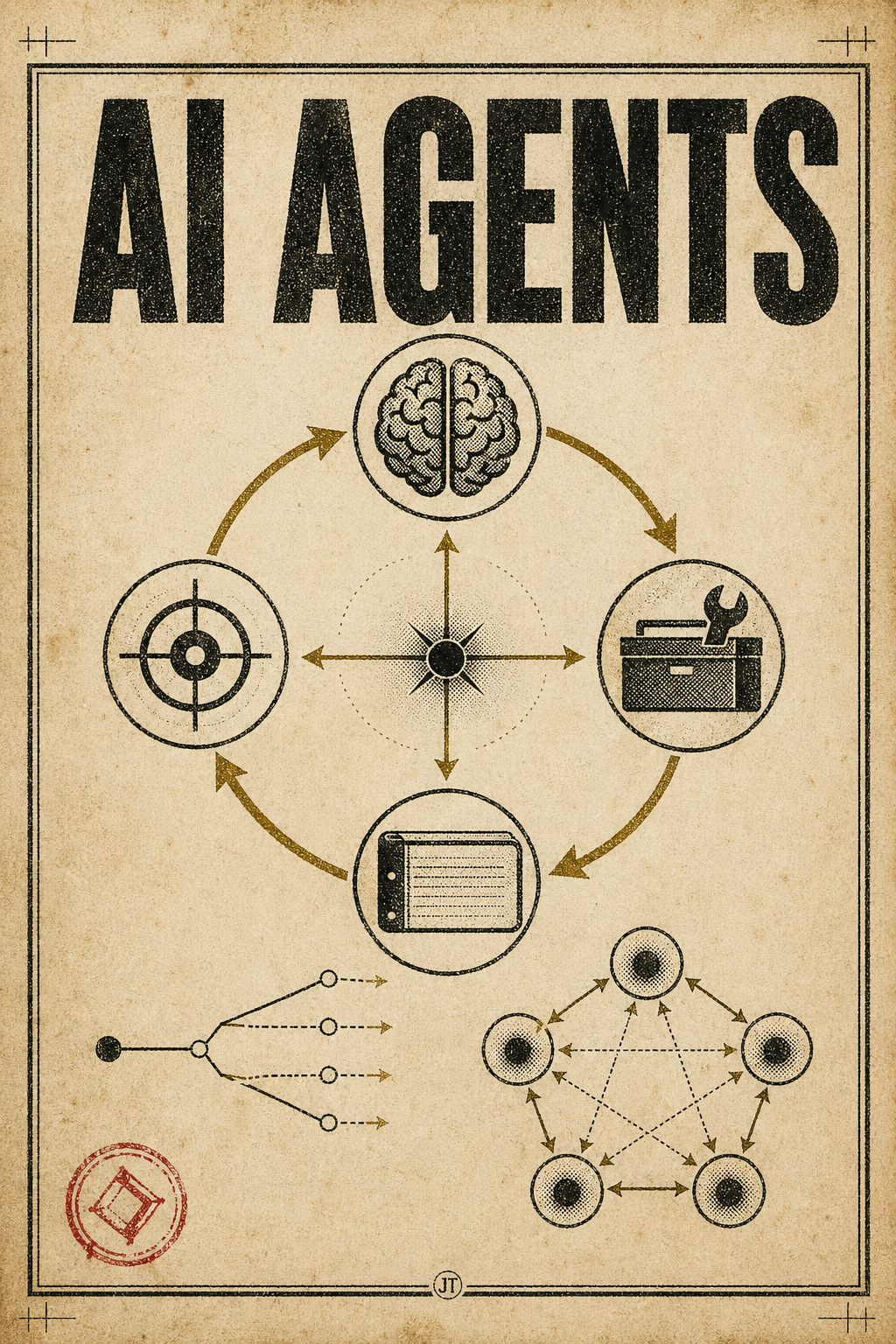
Start with what an LLM cannot do. It can answer almost any question you put in front of it, but only up to the date its training stopped, and it cannot reach into the world. It cannot click a button, fetch today's stock price, or write a row to your database. It can only talk.
An agent is what you get the moment you hand that model a set of tools and a goal. Tell it 'research Apple stock for me' and it begins to decide on its own which tool to call, in what order, until the work is done. That is the whole trick. An agent is an LLM, plus tools, plus a goal — nothing more.
THE BIG PICTURE
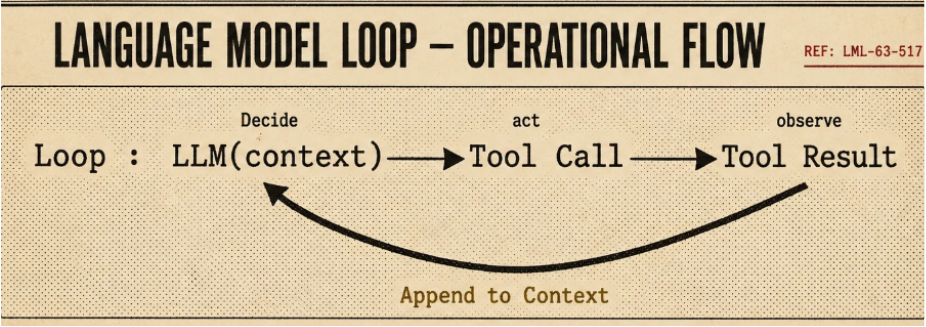
Underneath the framing, every agent is a control loop. The model proposes an action, the runtime executes it, the result is fed back into the conversation, and the loop runs again. It keeps spinning until the goal is reached, the model decides it is done, or a stop condition fires.
THE MENTAL MODEL
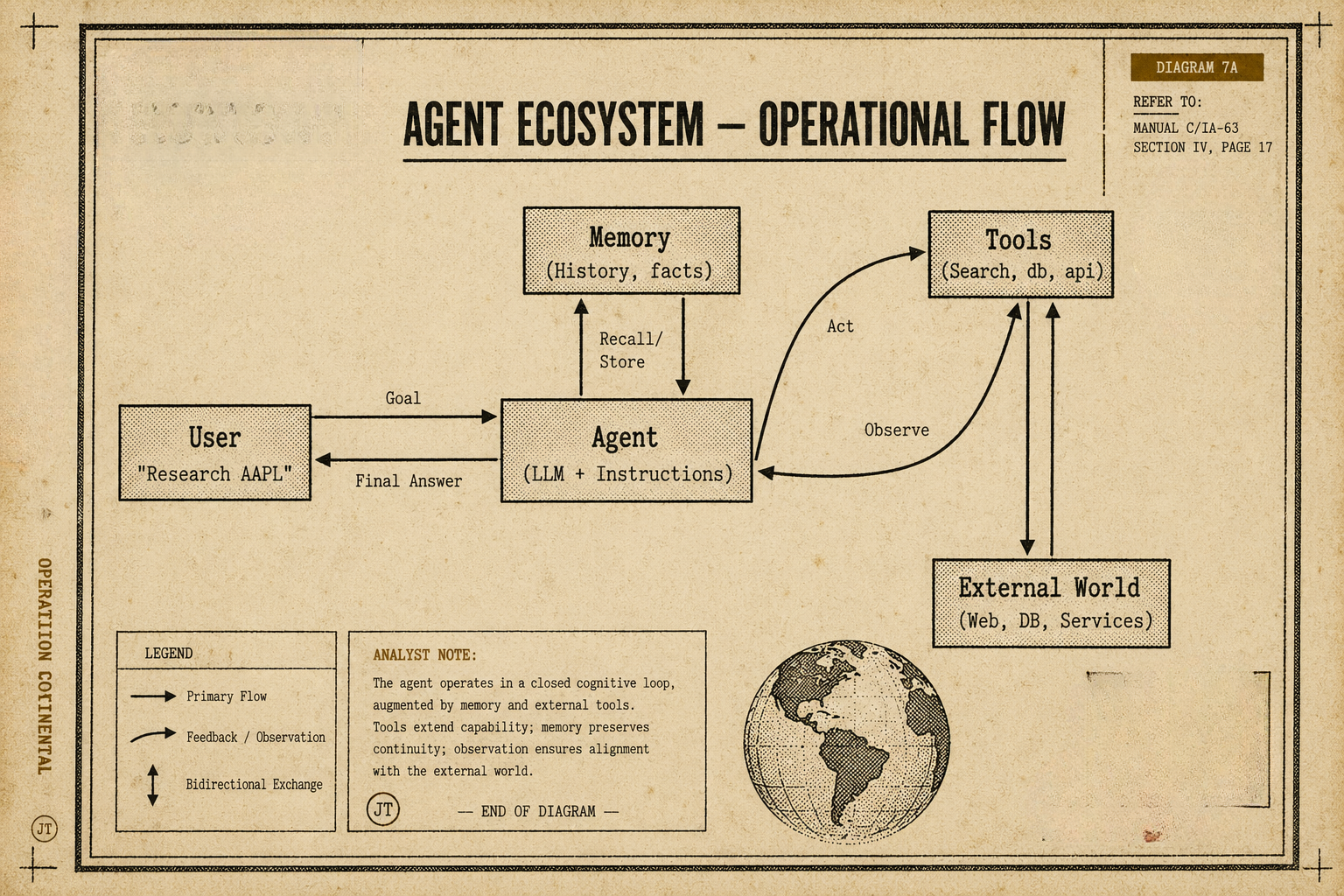
It helps to keep the same picture in your head every time you reason about an agent. The model is the brain. The tools are the hands. The runtime is the spine that wires them together and decides when the loop ends. Once you have those three boxes drawn, every feature in the SDK lands somewhere on the diagram.
WHERE THE SDK FITS
The OpenAI Agents SDK sits one layer above the raw client. It does not replace the API — you can still drop down to it whenever you need to. What the SDK gives you is a small set of opinionated primitives: Agent, Runner, Tool, Handoff, Guardrail, and Session. Most production code ends up being some combination of these, so the SDK is essentially a vocabulary for the patterns you would have built yourself anyway.
THE PRIMITIVES
AGENT
An agent is, more than anything, a role. 'You are a financial analyst. You speak in clear bullets. You always cite your sources. You can call web_search and fetch_filing.' That description, plus a model behind it, is the agent.
In the SDK, an Agent has a few required pieces and a few optional ones:
- instructions — the system prompt; the personality and the rules.
- model — which LLM is doing the thinking.
- tools — the callables the model is allowed to invoke.
- output_type — an optional Pydantic model when you want structured output.
- handoffs — other agents this one is allowed to transfer control to.
- guardrails — validators that gate the input or the output of a run.
from agents import Agent
market_research_agent = Agent(
name="Market Research",
instructions="""
You are a meticulous equity research analyst.
Always cite primary sources. Never invent numbers.
If unsure, call a tool rather than guessing.
"""
)TOOLS
A tool is just a Python function the model is allowed to call. The SDK reads the function's signature and docstring, turns them into a JSON schema, and ships that schema along to the model. When the model decides it needs data, the SDK calls the function for you and feeds the return value back into the conversation. You write Python; the SDK handles the wire format.
from agents import function_tool
from pydantic import BaseModel
class Quote(BaseModel):
ticker: str
price: float
currency: str
as_of: str
@function_tool
async def get_market_quote(ticker: str) -> Quote:
"""
Return the latest market quote for the given ticker symbol.
Args:
ticker: Uppercase symbol, e.g. 'AAPL', 'MSFT'
"""
data = await market_data_client.latest(ticker)
return Quote(
ticker=ticker,
price=data.price,
currency=data.currency,
as_of=timestamp.isoformat()
)MEMORY AND CONTEXT
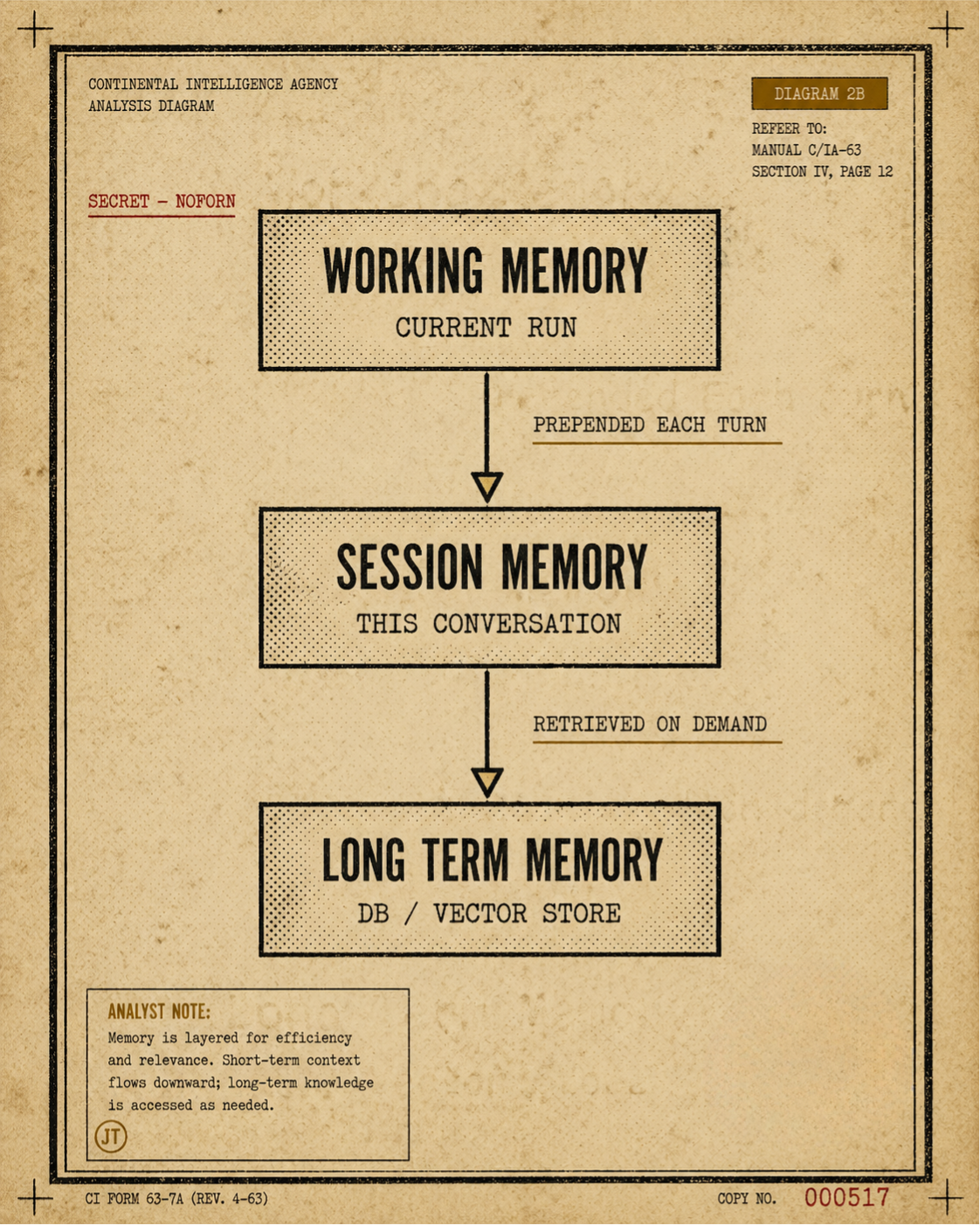
Every call to the model is independent. There is no shared brain between calls. Memory, in this world, is just text we paste back in at the start of every call, and different memory strategies are different rules for choosing what text to paste.
Three layers are worth keeping separate in your head:
- Working memory — the current run's message list. The SDK manages this inside the loop.
- Session memory — conversation history that persists across runs, keyed by a session ID. The SDK ships Session backends for this.
- Long-term memory — facts and artefacts that live in your database or vector store, retrieved on demand through a tool.
PLANNING
Planning shows up in two shapes.
The first is implicit. The model thinks step by step inside a single call — Chain of Thought, ReAct, that family. You do not have to do anything special; modern models do this naturally if you ask them to.
The second is explicit. A dedicated planner agent emits a structured plan as a Pydantic object, and worker agents go off and execute the steps. It is heavier to set up, but it is what you want when runs are long, when they branch, or when someone is going to audit the trace afterwards.
from pydantic import BaseModel
from typing import Literal
class PlanStep(BaseModel):
id: int
action: Literal["fundamentals", "sentiment", "risk", "summarize"]
rationale: str
class ResearchPlan(BaseModel):
ticker: str
horizon_days: int
steps: list[PlanStep]
planner = Agent(
name="Planner",
instructions="Produce a 3-6 step research plan. Be specific.",
model="gpt-4o-mini",
output_type=ResearchPlan
)MULTI-AGENT COORDINATION
When a single agent is not enough, the SDK gives you two ways to compose them.
A handoff transfers the entire conversation from agent A to agent B. B sees A's history and continues from there. From the user's seat it still feels like one assistant; under the hood, the brain has been swapped.
Agent-as-tool is the other direction. Agent A wraps agent B as a callable tool. A stays in charge of the conversation, summons B for a sub-question, and gets a single answer back.
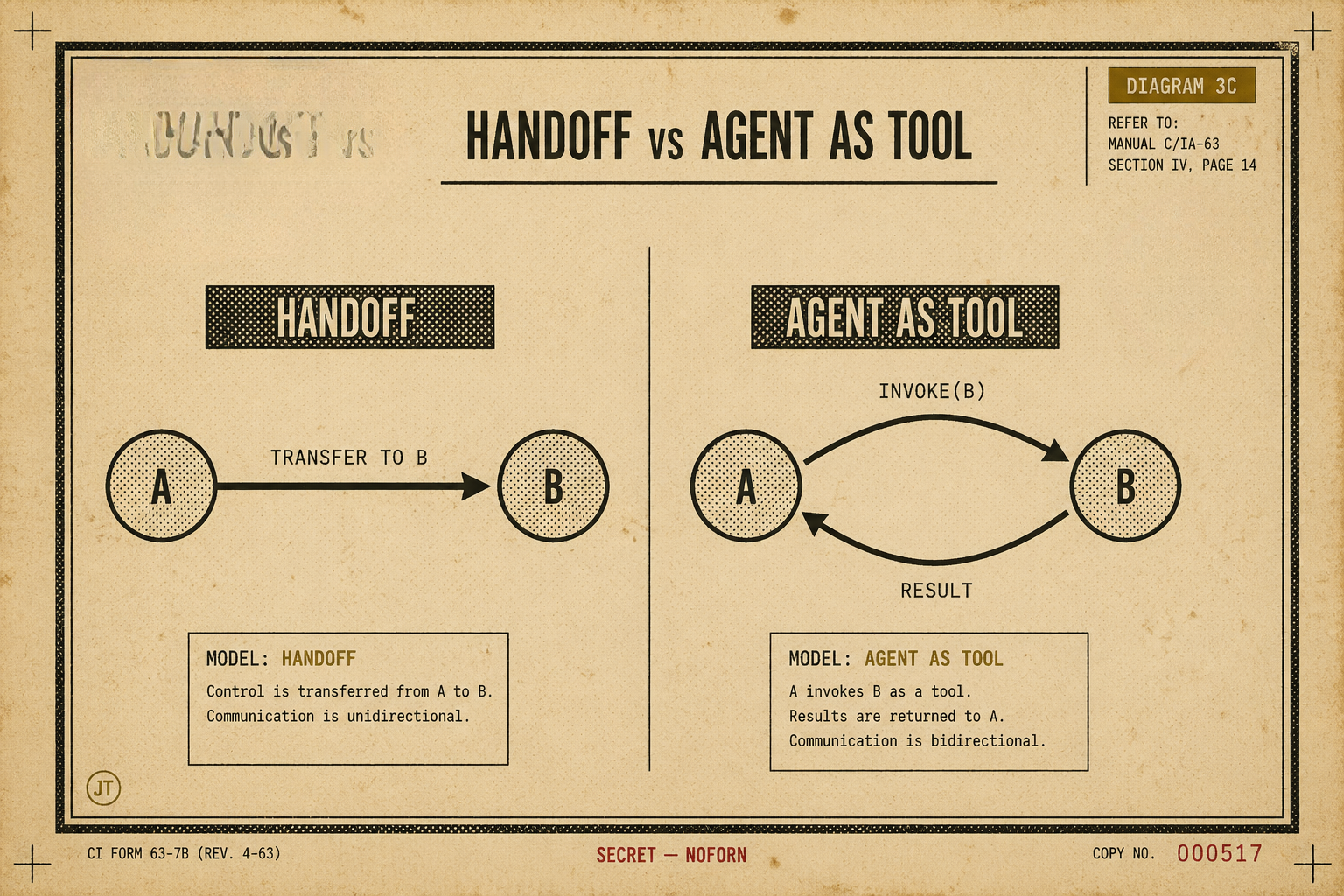
Choosing between them comes down to who should be doing the talking. Hand off when the user-facing voice should change ('Transferring you to billing'). Wrap as a tool when the orchestrator should remain the spokesperson and only delegate the sub-questions it does not want to answer itself.
FUNCTION CALLING
Function calling is the wire-level mechanism that sits underneath tools. The model emits a small JSON object — { name, arguments } — the runtime executes it, and the result goes back into the conversation as a tool message. The SDK hides all the schema generation and dispatch, but it is worth knowing what is actually being sent across the wire when you are debugging a run that is misbehaving.
STREAMING
Three streamable event types are worth handling in any UI:
- Token deltas — for the answer-as-it-types effect.
- Tool events — so you can show 'Calling web_search…' while the tool is running.
- Handoff events — so you can show 'Transferring to RiskAgent…' when the brain swaps.
from agents import Runner
async def stream_research(query: str, session_id: str):
result = Runner.run.streamed(triage_agent, query, session=Session(session_id))
async for event in result.stream_events():
if event.type == "raw_response_event":
yield {"type": "token", "delta": event.data.delta}
elif event.type == "agent_updated_stream_event":
yield {"type": "handoff", "agent": event.new_agent.name}
elif event.type == "run_item_stream_event":
yield {"type": "tool", "name": event.item.tool_name}GUARDRAILS AND SAFETY
A guardrail is a bouncer. It stands at the door of the run, looks at either the input or the output, and either lets it through or stops the whole thing with a polite refusal.
Input guardrails run before the model. Use them to block PII, prompt injection, and off-topic queries. Output guardrails run after the model. Use them to enforce structure, redact secrets, or veto policy violations.
from agents import input_guardrail, GuardrailFunctionOutput
class TopicCheck(BaseModel):
is_finance_related: bool
reasoning: str
topic_judge = Agent(
name="TopicJudge",
instructions="Return True iff the user's query is about finance, investing, markets, companies, or economics.",
output_type=TopicCheck,
model="gpt-4o-mini",
)
@input_guardrail
async def stay_on_topic(ctx, agent, user_input):
verdict = await Runner.run(topic_judge, user_input)
return GuardrailFunctionOutput(
output_info=verdict.final_output,
tripwire_triggered=not verdict.final_output.is_finance_related,
)WRAPPING UP
There is more in the SDK than what is here — tracing, callbacks, MCP wiring, and so on — but the six primitives above are the load-bearing ones. Everything else is plumbing on top. Once Agent, Runner, Tool, Handoff, Guardrail, and Session feel familiar, the rest of the documentation reads quickly, and most of the patterns you find in production code stop looking exotic.